 宗宗酱
宗宗酱
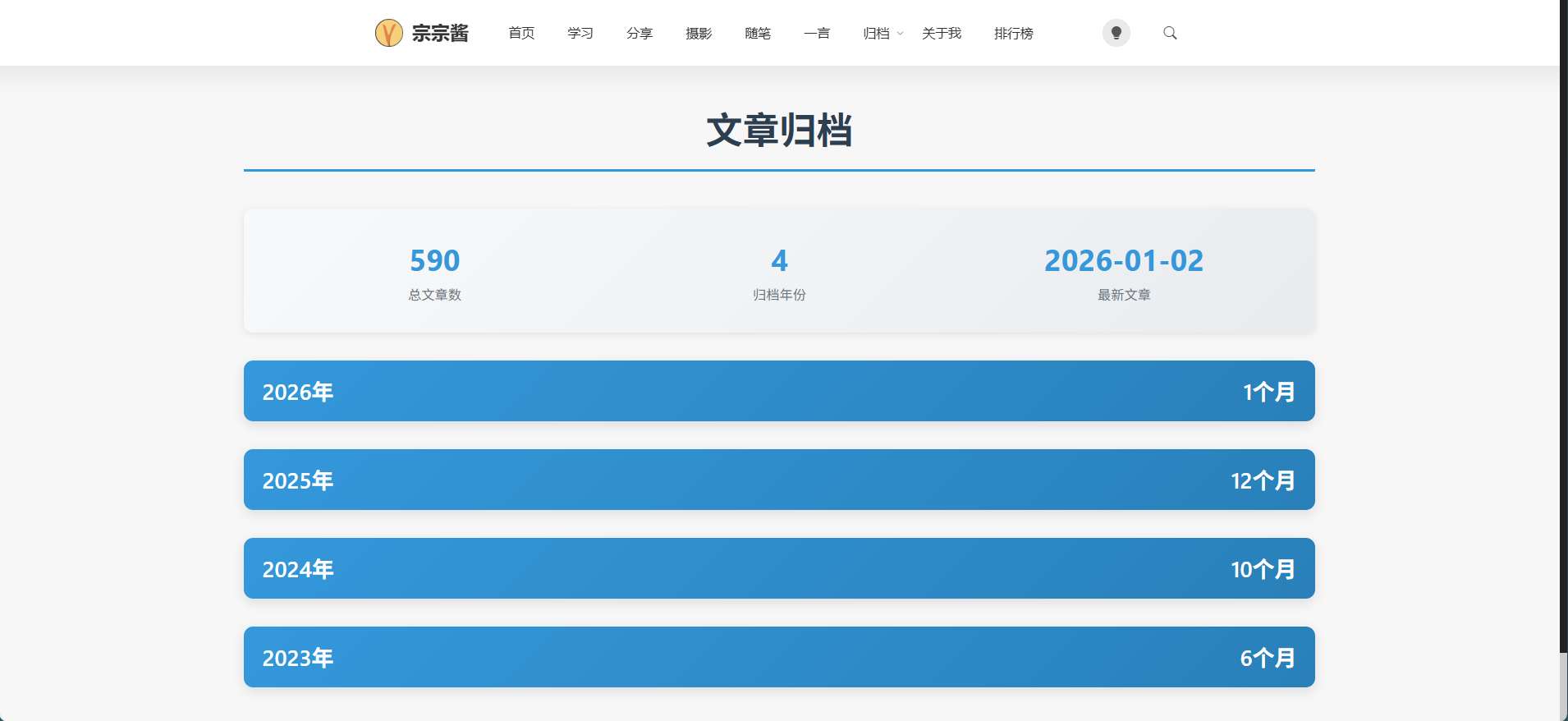
为啥会捣鼓这个归档代码,因为目前博客的PHP版本在7.4然后WordPress后台一直给我推送提示当前版本过低,然后升级版本。今天就去切换成了8.2版本,结果给我提示:
plugins/clean-archives-reloaded/clean-archives-reloaded.php:321 中的未定义函数 create_function() 栈跟踪: #0
这个Clean Archives Reloaded文章归档插件有问题,然后去搜了下是什么问题。这个错误是由于PHP 8.2中移除了 create_function() 函数导致的。 create_function() 函数在PHP 7.2中被弃用,在PHP 8.0中被完全移除,所以当你从PHP 7.4升级到8.2时,使用了这个函数的插件就会出现致命错误。
那没有办法,去插件市场看了下都没有心仪的归档插件。然后我就直接提出需求让AI给我写了一个页面模板。还挺不错的。
. 为什么需要自定义文章归档页面 :提升用户体验、增强网站专业性、提高页面粘性、优化SEO
2. 功能特点设计 :按年月分类、折叠/展开功能、响应式设计、统计信息展示、本地存储、平滑动画效果、精美的渐变色彩
3. 技术实现 : - PHP逻辑实现:获取和组织文章数据 - CSS样式设计:核心样式结构和响应式设计 - JavaScript交互实现:折叠/展开功能和状态记忆功能
4. 使用方法 :上传模板文件、创建归档页面、访问归档页面
5. 自定义和扩展 :修改颜色方案、添加搜索功能、显示文章摘要
6. 性能优化建议 :使用缓存、分页处理、延迟加载、优化数据库查询
7. 总结 :强调自定义归档页面的价值和实现的可行性
技术亮点:
 - 使用现代PHP、CSS和JavaScript技术 - 实现了响应式设计,适配各种设备
 - 添加了本地存储功能,记住用户的折叠状态偏好
 - 使用了精美的渐变色彩和平滑动画效果
- 提供了完整的代码示例和详细的实现步骤
应用场景:
- WordPress博客文章归档页面
- 内容管理系统的文章导航
- 企业网站的新闻归档 - 个人博客的内容
以下是代码:
<?php
/*
Template Name: 文章归档页面
Description: 精美的文章归档页面,按年月分类,支持折叠效果
*/

get_header();
?>

<style>
/* 归档页面样式 */
.archive-container {
    max-width: 1200px;
    margin: 0 auto;
    padding: 20px;
    font-family: -apple-system, BlinkMacSystemFont, 'Segoe UI', Roboto, 'Helvetica Neue', Arial, sans-serif;
}

.archive-title {
    text-align: center;
    font-size: 2.5rem;
    font-weight: 700;
    color: #2c3e50;
    margin-bottom: 40px;
    padding-bottom: 20px;
    border-bottom: 3px solid #3498db;
}

.archive-year {
    margin-bottom: 30px;
    border-radius: 10px;
    overflow: hidden;
    box-shadow: 0 4px 12px rgba(0, 0, 0, 0.1);
    background: #ffffff;
}

.archive-year-header {
    background: linear-gradient(135deg, #3498db 0%, #2980b9 100%);
    color: white;
    padding: 15px 20px;
    font-size: 1.5rem;
    font-weight: 600;
    cursor: pointer;
    display: flex;
    justify-content: space-between;
    align-items: center;
    transition: all 0.3s ease;
}

.archive-year-header:hover {
    background: linear-gradient(135deg, #2980b9 0%, #1c638f 100%);
    transform: translateY(-2px);
    box-shadow: 0 6px 16px rgba(0, 0, 0, 0.15);
}

.archive-year-header.active {
    background: linear-gradient(135deg, #27ae60 0%, #229954 100%);
}

.archive-year-content {
    display: none;
    padding: 0;
    overflow: hidden;
}

.archive-year-content.expanded {
    display: block;
}

.archive-month {
    padding: 20px;
    border-bottom: 1px solid #ecf0f1;
}

.archive-month:last-child {
    border-bottom: none;
}

.archive-month-title {
    font-size: 1.2rem;
    font-weight: 600;
    color: #34495e;
    margin-bottom: 15px;
    padding-left: 10px;
    border-left: 4px solid #3498db;
}

.archive-posts {
    list-style: none;
    padding: 0;
    margin: 0;
}

.archive-post {
    padding: 12px 0;
    padding-left: 20px;
    position: relative;
    transition: all 0.3s ease;
    border-bottom: 1px solid #f0f2f5;
}

.archive-post:last-child {
    border-bottom: none;
}

.archive-post:before {
    content: "▸";
    position: absolute;
    left: 0;
    color: #3498db;
    transition: transform 0.3s ease;
}

.archive-post:hover {
    background-color: #f8f9fa;
    padding-left: 25px;
}

.archive-post:hover:before {
    transform: translateX(5px);
    color: #2980b9;
}

.archive-post a {
    color: #2c3e50;
    text-decoration: none;
    transition: color 0.3s ease;
}

.archive-post a:hover {
    color: #3498db;
}

.archive-post-meta {
    font-size: 0.9rem;
    color: #7f8c8d;
    margin-left: 10px;
}

/* 响应式设计 */
@media (max-width: 768px) {
    .archive-container {
        padding: 10px;
    }

    .archive-title {
        font-size: 2rem;
    }

    .archive-year-header {
        font-size: 1.3rem;
    }

    .archive-month {
        padding: 15px;
    }
}

/* 加载动画 */
.loading {
    text-align: center;
    padding: 40px;
    color: #7f8c8d;
    font-size: 1.1rem;
}

/* 统计信息 */
.archive-stats {
    background: linear-gradient(135deg, #f8f9fa 0%, #e9ecef 100%);
    padding: 20px;
    border-radius: 10px;
    margin-bottom: 30px;
    box-shadow: 0 2px 8px rgba(0, 0, 0, 0.08);
    display: flex;
    justify-content: space-around;
    flex-wrap: wrap;
}

.stat-item {
    text-align: center;
    margin: 10px;
    flex: 1;
    min-width: 150px;
}

.stat-number {
    display: block;
    font-size: 2rem;
    font-weight: 700;
    color: #3498db;
    margin-bottom: 5px;
}

.stat-label {
    font-size: 0.9rem;
    color: #6c757d;
}
</style>

<div class="archive-container">
    <h1 class="archive-title">文章归档</h1>

    <?php
    // 获取所有文章并按年月分组
    $args = array(
        'post_type' => 'post',
        'posts_per_page' => -1,
        'orderby' => 'date',
        'order' => 'DESC'
    );

    $posts = get_posts($args);
    $archive_data = array();

    // 按年月组织文章
    foreach ($posts as $post) {
        $year = get_the_date('Y', $post);
        $month = get_the_date('m', $post);
        $month_name = get_the_date('F', $post);

        $archive_data[$year][$month] = array(
            'month_name' => $month_name,
            'posts' => array()
        );
    }

    // 重新遍历,填充文章数据
    foreach ($posts as $post) {
        $year = get_the_date('Y', $post);
        $month = get_the_date('m', $post);

        $archive_data[$year][$month]['posts'][] = array(
            'id' => $post->ID,
            'title' => get_the_title($post),
            'link' => get_permalink($post),
            'date' => get_the_date('Y-m-d', $post)
        );
    }

    // 统计信息
    $total_posts = count($posts);
    $total_years = count($archive_data);
    $latest_post = reset($posts);
    $latest_date = $latest_post ? get_the_date('Y-m-d', $latest_post) : '';
    ?>

    <!-- 统计信息 -->
    <div class="archive-stats">
        <div class="stat-item">
            <span class="stat-number"><?php echo $total_posts; ?></span>
            <span class="stat-label">总文章数</span>
        </div>
        <div class="stat-item">
            <span class="stat-number"><?php echo $total_years; ?></span>
            <span class="stat-label">归档年份</span>
        </div>
        <div class="stat-item">
            <span class="stat-number"><?php echo $latest_date; ?></span>
            <span class="stat-label">最新文章</span>
        </div>
    </div>

    <!-- 归档列表 -->
    <div class="archive-list">
        <?php foreach ($archive_data as $year => $months) : ?>
            <div class="archive-year">
                <div class="archive-year-header" onclick="toggleYear('year-<?php echo $year; ?>')">
                    <span><?php echo $year; ?>年</span>
                    <span><?php echo count($months); ?>个月</span>
                </div>
                <div class="archive-year-content" id="year-<?php echo $year; ?>">
                    <?php foreach ($months as $month => $month_data) : ?>
                        <div class="archive-month">
                            <h3 class="archive-month-title"><?php echo $month_data['month_name']; ?></h3>
                            <ul class="archive-posts">
                                <?php foreach ($month_data['posts'] as $post) : ?>
                                    <li class="archive-post">
                                        <a href="<?php echo $post['link']; ?>" target="_blank"><?php echo $post['title']; ?></a>
                                        <span class="archive-post-meta">(<?php echo $post['date']; ?>)</span>
                                    </li>
                                <?php endforeach; ?>
                            </ul>
                        </div>
                    <?php endforeach; ?>
                </div>
            </div>
        <?php endforeach; ?>
    </div>
</div>

<script>
// 折叠效果实现
function toggleYear(yearId) {
    const yearContent = document.getElementById(yearId);
    const yearHeader = yearContent.previousElementSibling;

    // 切换内容显示状态
    yearContent.classList.toggle('expanded');
    yearHeader.classList.toggle('active');

    // 保存状态到localStorage
    const isExpanded = yearContent.classList.contains('expanded');
    localStorage.setItem('archive_year_' + yearId, isExpanded ? '1' : '0');
}

// 页面加载时恢复折叠状态
document.addEventListener('DOMContentLoaded', function() {
    const yearHeaders = document.querySelectorAll('.archive-year-header');

    yearHeaders.forEach(header => {
        const yearContent = header.nextElementSibling;
        const yearId = yearContent.id;
        const savedState = localStorage.getItem('archive_year_' + yearId);

        // 默认展开当前年份
        const currentYear = new Date().getFullYear();
        const yearNumber = parseInt(yearId.replace('year-', ''));

        if (savedState === '1' || yearNumber === currentYear) {
            yearContent.classList.add('expanded');
            header.classList.add('active');
        }
    });

    // 添加平滑滚动效果
    document.querySelectorAll('a[href^="#"]').forEach(anchor => {
        anchor.addEventListener('click', function (e) {
            e.preventDefault();
            document.querySelector(this.getAttribute('href')).scrollIntoView({
                behavior: 'smooth'
            });
        });
    });
});
</script>

<?php get_footer(); ?>
如何使用了?将创建的 archive.php 文件上传到你的 WordPress 主题目录通常路径:/wp-content/themes/你的主题名称/
1. 创建归档页面 :
登录 WordPress 后台
点击"页面" > "添加新页面"
输入页面标题,如"文章归档"
在右侧"页面属性" >"模板"中选择"文章归档页面"
点击"发布"按钮
2. 访问归档页面 :
发布后,点击"查看页面"按钮
或者在前台访问 你的网站.com/文章归档 (具体URL取决于你的固定链接设置)
模板结构
统计区域 :显示总文章数、归档年份和最新文章日期
年份列表 :按年份分组,支持折叠/展开
月份列表 :每个年份下按月份显示
文章列表 :每个月份下显示文章标题和发布日期







这个页面 很有必要
@刘郎 这个页面确实重要,我有时候就经常看归档内容。还有做总结回顾一个月的时候记录了下啥。
有些主题插件只支持PHP,以至于我一直用7.4也不敢升
@Hary 是啊,很恼火。